Babysits - Find Babysitters
- 4.2
- Rating
- 1.00M
- Installs
- Free
- Price

 Analysis by App-foxy
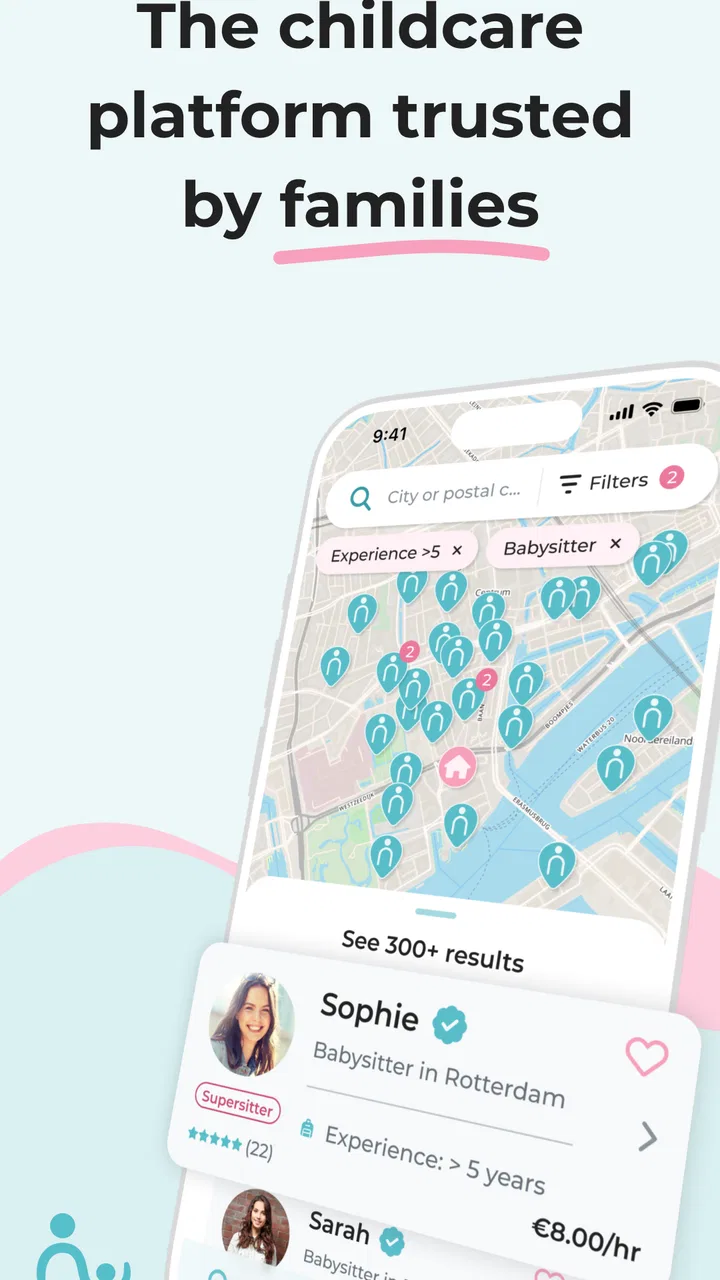
I found Babysits - Find Babysitters most useful when I treated it as a practical meeting point rather than a complete childcare management system. It is a free parenting app from Babysits that helps parents search for babysitters, start conversations, and organize appointments from a phone. That sounds simple, but the value becomes clearer on a busy day when arranging care involves several people, changing times, and a last-minute decision.
My overall impression is that the app is aimed at reducing the awkward back-and-forth that usually happens through general messaging apps or local posts. Instead of searching through unrelated social feeds, I can focus on childcare profiles and the details that matter to a family. It is not a replacement for personal judgement, references, or a proper conversation, but it can make the first stage of finding help much more manageable.
How Babysits feels during everyday use
I find that the app’s everyday value depends less on how quickly I can browse and more on whether it helps me make a considered choice without losing track of practical details. I’d use it to keep the search focused, while treating each conversation as an opportunity to check fit and expectations. That leads naturally to the more important question of what a parent should verify before relying on a new childcare connection.
You May Also Like

 Blood Strike: 2.5 Anniversary
Blood Strike’s Loadouts Turn Every Drop Into a Tactical Gamble
A close look at Blood Strike’s custom loadouts: how fast access to signature weapons reshapes its battle royale rhythm, rewards preparation, and narrows the gap between fights.

 Pandora - Music & Podcasts
Pandora’s Music Is Easy to Start, but Harder to Recover
Pandora’s strength is its low-effort path from a seed to a station. Its weak spot is how much confidence it asks you to place in connection, setup, and quiet recovery.

 8 Ball Pool
 Is Built on Rivalries, Rematches, and Routine
A close look at the rivalries, rematches, shared routines, and unanswered safety questions that turn a quick pool match into a persistent mobile community.

 Samsung Music
’s Quiet Strength Is Playing What You Already Own
Its reach comes less from spectacle than from dependable access to a personal library. That simplicity is both the app’s strongest retention engine and its ceiling.

 AccuWeather: Weather Radar
AccuWeather Review: A Quick, Clear Forecast for Everyday Decisions
For everyday plans, the best forecast is the one you can understand quickly. AccuWeather makes rain timing, radar, and local conditions easy to act on, with a few trade-offs.

 Hill Climb Racing
Why Hill Climb Racing Still Turns Crashes Into One More Run
A tiny car, a bumpy hill and one more upgrade: Hill Climb Racing keeps resurfacing because its simple chaos makes every near-miss feel personal.
More From Our News Desk



Quick enough for the first search
The most important speed question here is not whether every screen opens instantly. It is whether I can move from “I need childcare” to a useful shortlist without feeling buried in unnecessary steps. The app’s purpose is focused, so the basic journey feels easier to understand than searching through a broad classifieds service. I can begin with the kind of care I need, look through available options, and decide whom to contact.
That focus matters when I am using the app between errands or while trying to organize an evening. A general social network may have more people, but it also brings unrelated posts, informal recommendations, and conversations that are difficult to compare. Babysits is more direct: it puts the search and connection process at the center.
I would still avoid opening it for the first time five minutes before leaving home and expecting the whole arrangement to be finished immediately. The app can help me discover and contact a sitter, but the human part remains essential. Availability, expectations, experience, location, and the child’s routine all need discussion. The app makes that exchange easier to begin; it does not remove the time needed to make a responsible choice.
For a family that regularly needs occasional care, the practical advantage is cumulative. Once I understand how I want to search and what information I need to ask for, each later search can feel more structured. I can also use the appointment-planning side to keep the agreed time clearer than it would be in a long, mixed-purpose chat.
What happens when the search gets busy
The heavier moments are likely to come when I am comparing several potential babysitters, replying to more than one conversation, and trying to fit care around work or family plans. This is where a focused childcare app has a real advantage over ordinary messaging. I can keep the search context connected to the people I am considering instead of losing it among unrelated messages.
There is also a trade-off. A dedicated marketplace encourages me to compare options, but comparison can become its own task. A longer list does not automatically mean a better decision. I found it more sensible to create a short list based on practical fit first, then ask focused questions rather than contacting everyone and creating a pile of conversations I cannot manage properly.
One useful workflow is to decide my non-negotiables before searching. I would write down the required time window, the children’s ages, the location, and whether the sitter needs to handle a particular routine. Then I would use the app to identify plausible matches and reserve the conversation for confirming details. This prevents the common mistake of choosing someone who looks promising but cannot actually cover the appointment.
Another helpful habit is to separate discovery from confirmation. I can browse and make an initial connection during a quiet moment, then return later when I have the calendar and household details in front of me. That is less stressful than trying to finalize everything while distracted. The app supports the organization of the process, but the quality of the result still depends on how carefully I use it.
A realistic family scenario
Imagine I have an appointment after work and need someone to look after my child for a few hours. I open the app, search for suitable babysitting options, and narrow my attention to people who appear compatible with the timing and situation. I contact a small number of candidates rather than sending the same vague message to a large group.
When someone replies, I would confirm the exact arrival and departure times, the child’s usual routine, emergency contact information, food or medication instructions, and what should happen if plans change. I would then use the appointment-planning function to keep the arrangement visible. Before accepting, I would still have a proper conversation and, where appropriate, arrange an introductory meeting. That last step is especially important for a first booking and cannot be replaced by a profile or an in-app exchange.
This scenario shows the app’s strongest role. It can reduce the friction of finding and organizing a possible sitter, particularly when I do not already have a trusted personal contact. It is less useful if I already know exactly whom I will hire and only need a simple calendar reminder.
Reliability is more than an open screen
When I judge reliability in a parenting app, I look at two separate things: whether the application is dependable as a tool and whether the people found through it are dependable in real life. Those are not the same. A smooth interface cannot guarantee that a babysitter will be the right fit, and a good sitter does not make every app interaction perfect.
Babysits has been available since November 17, 2016, and the Android listing shows more than a million installs. Its average rating is 4.0 from around eleven thousand ratings, which suggests that many people find it useful while also leaving room for mixed experiences. I read that as a reason to approach it confidently but not blindly: the app has an established audience, yet every family should still evaluate a candidate independently.
The developer is Babysits, which keeps the product identity closely tied to the service it provides. That is helpful because the app does not feel like an unrelated tool bolted onto a childcare website. At the same time, I would not confuse a recognizable service with a personal recommendation. I still need to check whether a profile suits my circumstances and whether communication feels clear and respectful.
Recovery matters when plans change. If a sitter becomes unavailable, I want to be able to return to the search rather than start from zero through a random local group. The app’s central value is that it gives me a dedicated place to reconnect with potential childcare options. Even so, I would keep my own notes about confirmed times and important instructions, especially for recurring arrangements. A second record reduces confusion when several adults are coordinating the same appointment.
I also recommend confirming the final arrangement in plain language. A message such as “Tuesday, from six until nine, at this address, with dinner already prepared” is safer than relying on an implied understanding. The app can support communication, but precise wording is still one of the best reliability tools available to a parent.
Device demands and Android compatibility
On Android, the current version is 9.1.6 and the minimum operating system is Android 7.0. That makes the app accessible to people who are not using the newest phone, although the experience will naturally depend on the age and condition of the device. A newer phone with limited free storage or an overloaded background setup may feel less responsive than a clean, well-maintained device.
I would not describe this as an app that should require a premium handset simply to perform its main purpose. Searching, reading profiles, communicating, and arranging appointments are ordinary mobile tasks. However, parents often use their phones under pressure, with low battery, weak connectivity, or several apps open at once. In those conditions, any service that depends on timely communication deserves a little preparation.
Before relying on it for an urgent booking, I would sign in, check that notifications behave as expected on my device, and make sure the phone can remain connected. I would also avoid treating the app as the only copy of essential childcare information. Keeping the address, contact details, and agreed schedule somewhere accessible is sensible if the phone becomes unavailable.
The Everyone age rating makes the app broadly suitable from a content perspective, but that should not be mistaken for an indication that every user is a child or that childcare decisions are automatically safe. The people using it are making adult decisions about children. The age label describes the app’s content classification, not the level of responsibility required from a parent.
Where the free model fits
The app is free to download, which makes it easy to try before deciding whether it belongs in my regular parenting routine. There are in-app purchases priced from $24.99 to $99.96 per item. That means I would pay attention to which parts of the service are available without payment and which optional choices may become relevant to my situation.
For a family that only needs occasional help, starting with the free experience is sensible. I can learn whether the local search is useful and whether communication suits the way I organize care before committing money. For someone who needs frequent childcare, a paid option might be worth considering if it saves meaningful time, but I would judge that against actual local availability rather than assuming a purchase guarantees a better match.
This is also a reason not to compare the app only with free neighborhood groups. Informal groups may cost nothing and can produce strong personal recommendations, especially when I already trust the community. Their weakness is that information can be scattered, outdated, or difficult to organize. Babysits offers a more dedicated route to discovery and planning, while a local recommendation may offer more personal context. In practice, I would use the app when I need to broaden the search and personal contacts when trust and familiarity are already available.
Who will get the most from it
I think the app is best for parents who need occasional babysitting, families who have recently moved, and people whose usual sitter is unavailable. It is particularly useful when I want to compare several possibilities without posting publicly in a general social group. The focused setting can make the first contact feel more purposeful.
It may also suit parents who prefer arranging details from a phone rather than maintaining a spreadsheet of names and messages. The appointment-planning element gives the process a clearer endpoint: the search should lead to an agreed time, not remain an open-ended conversation.
I would be more cautious if I needed highly specialized childcare, complex medical support, or a formal agency arrangement with extensive documentation. In those situations, a professional childcare provider or agency may be a better fit because the requirements go beyond finding and contacting a sitter. I would also skip this app if I already have a dependable network and only want a basic reminder tool; adding another service could create more administration instead of less.
Small habits that improve the experience
My first tip is to search with a complete plan, not just a date. Knowing the children’s ages, the exact time range, the neighborhood, and the expected duties makes it easier to recognize a realistic match. It also reduces the chance of beginning a conversation that cannot lead anywhere.
My second tip is to keep the first message specific. I would introduce the situation briefly, state the required time, and ask whether the person is genuinely available. This is more efficient than exchanging several vague messages before discovering a scheduling conflict.
My third tip is to treat the appointment as a coordination checkpoint. Before confirming, I would repeat the practical details and make sure everyone understands what the sitter is expected to do. This is especially valuable when the booking is arranged by one parent but another adult will be present at drop-off or pickup.
Finally, I would use the app to widen my options, not to rush my judgement. A polished profile or quick reply is only an opening signal. A short call, a meeting, and clear references or recommendations may be more important than how quickly I can complete the in-app steps.
My performance verdict
Babysits succeeds because it concentrates a common parenting problem into one place: finding possible babysitters, contacting them, and planning an appointment. In my experience, that focus gives it a practical speed advantage over general social networks and scattered message threads. It feels most valuable when I need to search beyond my immediate circle but still want a structured way to organize the next step.
Its performance should be judged by usefulness rather than by raw speed. The app can make discovery and coordination more orderly, but it cannot make a careful childcare decision instant. On a modest Android device that meets the Android 7.0 requirement, I would expect the main tasks to be reasonable, provided the phone and connection are in good shape. I would also prepare a backup contact method for urgent arrangements.
With a 4.0 average and a sizeable installed audience, it appears to be a credible option rather than an experiment with no real user base. Still, the mixed rating is a reminder to keep expectations realistic. Local availability, the quality of individual profiles, and the way a family communicates will shape the result more than the app alone.
My recommendation is straightforward: try it if you need a focused way to look for babysitting help and organize possible appointments, especially after moving or losing access to a regular sitter. Begin with the free experience, build a short list carefully, and verify every important detail personally. The app is a useful starting point for finding childcare, not a substitute for trust, conversation, and responsible supervision.
FAQs for Babysits - Find Babysitters
01What is Babysits and how does it work?
Babysits is a platform designed to connect parents with babysitters and nannies in their area. Parents can browse profiles, check ratings, and read reviews to find the perfect caregiver. Babysitters can create profiles, list their qualifications, and apply for jobs. The app facilitates communication and scheduling, making it easier to find reliable childcare.
02Is Babysits safe to use for finding childcare?
Safety is a top priority for Babysits. The platform includes features such as verified profiles, background checks, and user reviews. Parents are encouraged to conduct interviews and meet potential babysitters in person before hiring. Babysits also provides safety tips and resources to ensure a secure experience for both parents and babysitters.
03Are there any fees associated with using Babysits?
Babysits offers both free and premium options. Creating a basic profile and browsing listings are free. However, premium subscriptions provide additional features like priority search placement and unlimited messaging. Parents and babysitters can choose the plan that best suits their needs, ensuring flexibility and affordability.
04How can I contact a babysitter through Babysits?
To contact a babysitter, parents can send messages directly through the app. Babysits provides a secure messaging system that allows for easy communication between parents and babysitters. Once connected, parents can discuss availability, rates, and any specific requirements directly with the babysitter.
05Can Babysits be used internationally?
Yes, Babysits is available in multiple countries and supports various languages. This international reach allows users to find babysitters whether at home or abroad. The app's global network ensures that parents can access reliable childcare options no matter where they are located, making it a versatile tool for travelers and expatriates.
Pros
- User-friendly interface is easy to navigate.
- Extensive database of babysitters available.
- Detailed profiles with reviews and ratings.
- Flexible booking options and scheduling.
- Secure communication through the app.
Cons
- Limited availability in rural areas.
- Subscription required for some features.
- Occasional bugs in the messaging feature.
- No background checks provided by app.
- App notifications can be overwhelming.

Babysits - Find Babysitters
Gallery